
Analytics Home: what to do today
Analytics Home is built so you can glance at it and know what to work on. Here's what each part shows.
Click Analytics at the top of the sidebar. There are six tabs across the top: Home, Traffic, Posts, Promotion, Updates, and Opportunities. On a small window they show as icons only.
Haven't connected Google yet? Home shows Let's get your numbers in and walks you through it. See Connect Google Analytics and Search Console.
Pick your dates
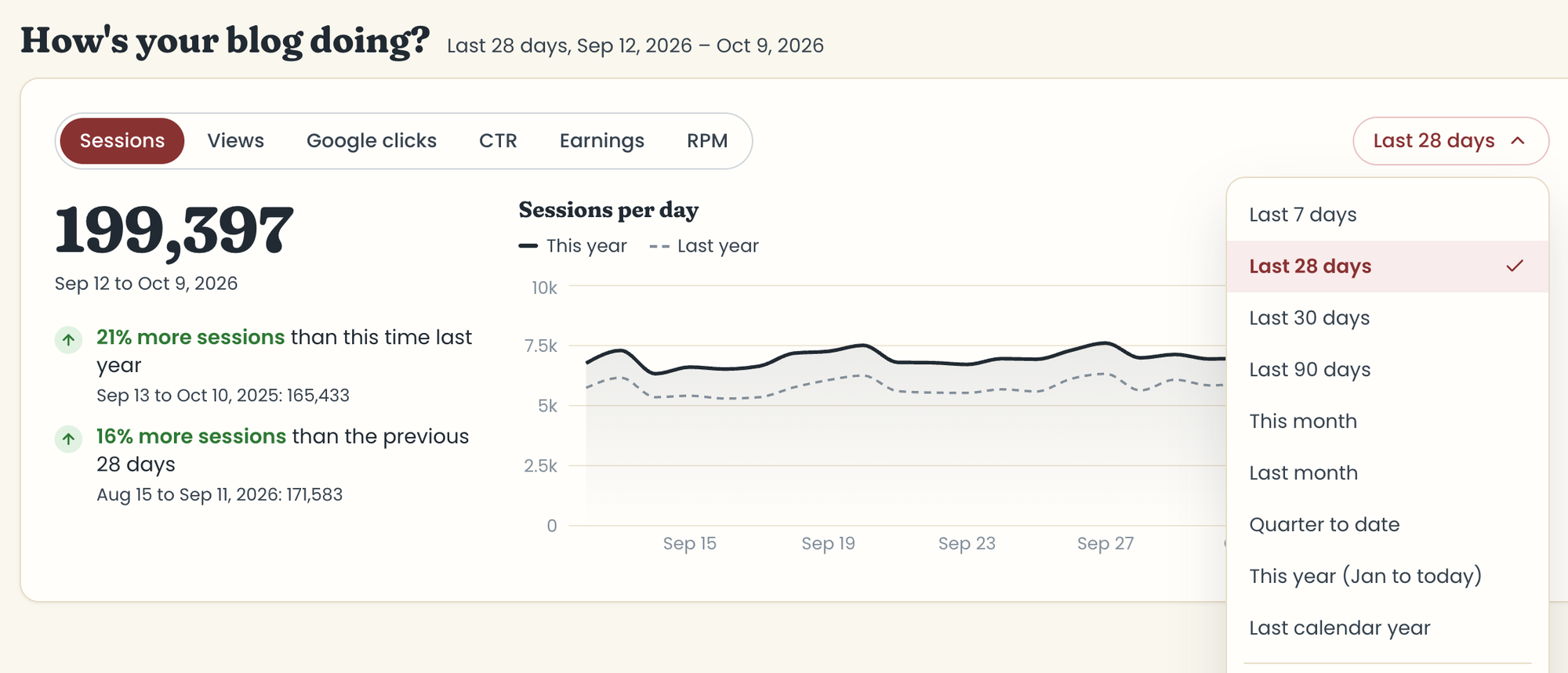
The dates menu at the top of How's your blog doing? sets the dates for that card, What's working, and Where your traffic comes from. Choose Last 7, 28, 30, or 90 days, This month, Last month, Quarter to date, This year, Last calendar year, or Custom. Every range ends on the last day Google has finished, about 3 days ago, so there's no Today or Yesterday.
What to do this week and Blog post updates always show this week, whatever dates you pick.
What each card shows
How's your blog doing?
Pick Sessions, Views, Google clicks, or CTR (plus Earnings and RPM with Raptive). The big number is the total for your dates. Below it, you see how that compares with the same time last year and with the days just before. A change under 3% reads "About the same." Ranges up to 92 days graph day by day; longer ones graph week by week.
What's working
What are your top posts? shows your 5 posts with the most sessions, where most of their traffic came from, and how they compare with last year.
What's gaining right now? shows the 5 posts that added the most sessions compared with the days just before.
What to do this week
Social media posts and email shows up to 4 recipes that peaked this week last year. Pinterest shows up to 4 that peaked on Pinterest 8 to 12 weeks from now, so you have time to pin them. Both come from the Promotion tab.
Blog post updates
What to update shows the top 6 posts from Opportunities. Did your updates work? shows up to 4 of your updates, results first. If Food Blog Studio spotted changes on your blog, a link takes you to the Updates tab to confirm them. See Updates.
Where your traffic comes from
A pie of your sessions by source, and how your top 5 sources are trending against last year. See what counts as each traffic source.
Good to know
- Your numbers update automatically every day. Google finishes its numbers a few days late, so your dates end about 3 days ago.
- Analytics is read only, and your Google data is never sent to any AI model.
Last updated October 12, 2026
Up nextTraffic: the big pictureStill need help? Send us a message at hello@foodblog.studio